
MCP 可以说是个炙手可热的话题。想必大多数人都已在铺天盖地的宣传介绍中对它有所耳闻。不过,网上大部分的使用介绍要么是基于 Mac 系统,要么是基于 WSL 环境,对于 Windows 用户来说,难免有些不便。所以今天就专门针对 Windows 系统用户的使用场景,给大家详细记录和分享一下 Figma MCP 相关的操作过程,希望能为大家提供一些参考与帮助。
Cursor Talk to Figma MCP 简介
Cursor Talk to Figma MCP 实现了 Cursor AI 和 Figma 之间的模型上下文协议(Model Context Protocol,MCP)集成,允许 Cursor 与 Figma 进行通信,以读取设计内容并以编程方式对其进行修改。
Github 地址:https://github.com/sonnylazuard
一、配置克隆项目
# 克隆项目
git clone https://github.com/sonnylazuardi/cursor-talk-to-figma-mcp.git
# 进入项目目录
cd cursor-talk-to-figma-mcp
# 使用Cursor打开项目
cursor .
二、安装 Bun
如果使用的 mac 或者安装了 WSL 的可以继续以下命令
# 安装Bun运行环境
curl -fsSL https://bun.sh/install | bash
# 配置项目环境
bun setup
# 启动WebSocket服务
bun start
windows 解决方案
考虑到有部分人使用的是 windows 系统,所以整理了 windows 的命令。
- 使用 PowerShell 替代方案
# 这是 Bun 官方提供的 PowerShell 安装方式(`irm` 是 `Invoke-RestMethod` 的别名,`iex` 是 `Invoke-Expression` 的别名)。
irm https://bun.sh/install | iex- 手动安装(推荐)
powershell 下载安装脚本:
curl -o install.sh https://bun.sh/install在 WSL 或 Git Bash 中执行该脚本:
bash install.sh执行完成后,Bun 已经成功安装到 ~/.bun/bin/bun,但系统无法找到 bun 命令。这是因为你需要将 Bun 的安装路径添加到 shell 的环境变量中,接下来我们来修改系统环境变量
- 以管理员身份运行 PowerShell:
右键点击 PowerShell 图标,选择 "以管理员身份运行"。 添加系统环境变量:
# 添加 BUN_INSTALL 环境变量 [Environment]::SetEnvironmentVariable( "BUN_INSTALL", "$env:USERPROFILE\.bun", [EnvironmentVariableTarget]::Machine ) # 将 Bun 路径添加到系统 PATH $currentPath = [Environment]::GetEnvironmentVariable("PATH", [EnvironmentVariableTarget]::Machine) $newPath = "$env:USERPROFILE\.bun\bin;$currentPath" [Environment]::SetEnvironmentVariable("PATH", $newPath, [EnvironmentVariableTarget]::Machine)验证配置:
关闭并重新打开 PowerShell 窗口,然后运行:# 检查环境变量是否正确设置 $env:BUN_INSTALL # 验证 bun 命令 bun --version
可以正常打印版本号即为成功
接下来启动服务即可
三、初始化项目
# 配置项目环境
# 该命令会在当前项目根目录创建一个 .cursor/mcp.json文件,这是Cursor MCP服务的配置文件
bun setup
# 启动WebSocket服务
bun socket
输出以下提示表示服务启动成功
如果是 windows 用户,配置这一步会提示
所以,让我们来解决他!
windows 解决方案
首先找到项目的配置文件 package.json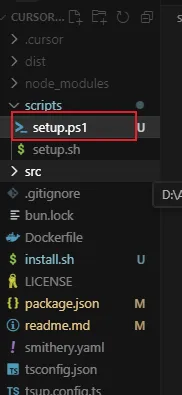
然后将"setup" 配置项改为
"setup": "node -e \"const os = require('os'); const { execSync } = require('child_process'); if (os.platform() === 'win32') { execSync('powershell -ExecutionPolicy Bypass -File ./scripts/setup.ps1', { stdio: 'inherit' }); } else { execSync('./scripts/setup.sh', { stdio: 'inherit' }); }\"",再在 script 下新增 setup.ps1 文件
内容如下
# PowerShell setup script for Windows

# Create .cursor directory if it doesn't exist
if (-not (Test-Path ".cursor")) {
    New-Item -ItemType Directory -Path ".cursor" -Force
}

# Install dependencies using bun
bun install

# Create mcp.json with the current directory path
$mcpConfig = @"
{
  "mcpServers": {
    "TalkToFigma": {
      "command": "bunx",
      "args": [
        "cursor-talk-to-figma-mcp@latest"
      ]
    }
  }
}
"@

$mcpConfig | Out-File -FilePath ".cursor/mcp.json" -Encoding UTF8

Write-Host "Setup completed successfully!" -ForegroundColor Green
之后我们再去 PowerShell 中执行命令即可
bun setup
bun socket
四、Figma 插件配置
1、在 Figma 中新建一个Drafts 文件
2、打开Plugins & widgets菜单
3、选择import from manifest选项
4、导入项目目录\src\cursor_mcp_plugin 下的manifest.json文件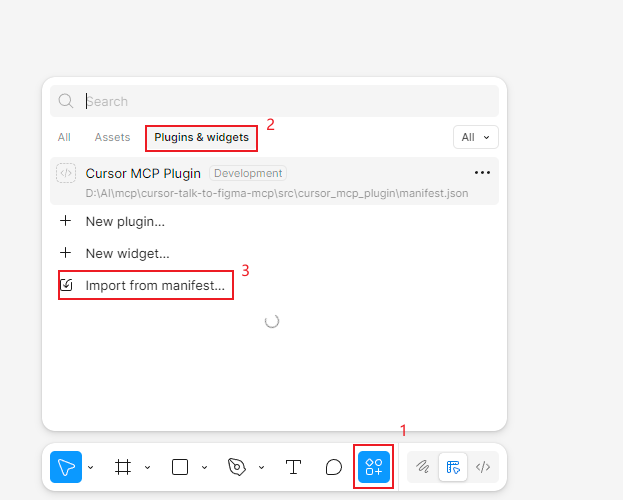
5、运行并记录 Channel 编码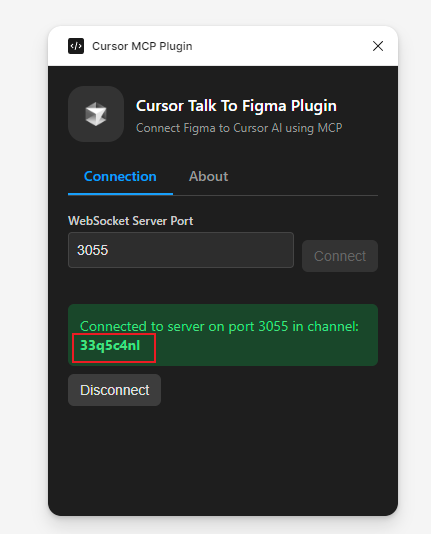
五、cursor 使用
Figma 服务建立连接
使用channel: 33q5c4nl 连接服务和Figma进行对话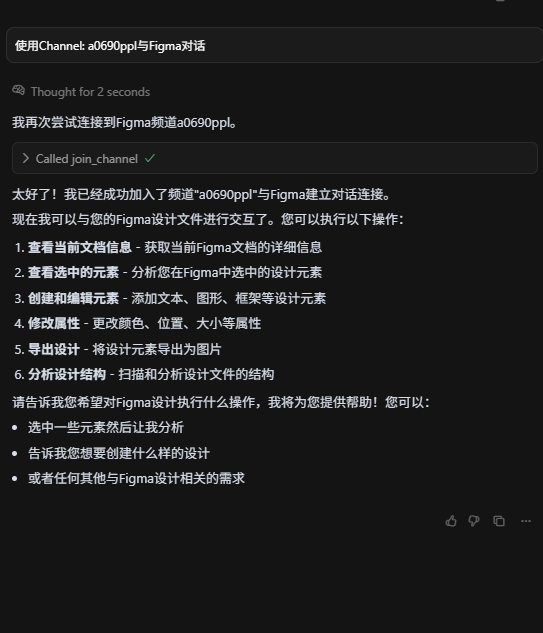
至此,我们的配置操作已经完成,开动你的想象力放手去干吧,接下来就是 Cursor 的表演时间!
凡是过往,皆为序章!



I just reviewed this South African slots influence while wisdom more with regard to modern online slots. The website provides helpful facts hither different vacancy formats and gameplay elements. The content is straightforward and reachable, making it helpful for both happy-go-lucky visitors and more prepared players. The place can be a useful starting point for further investigation.
I recently discovered this useful slots resource while researching online casino games. This resource offers usable message hither heroic mechanics, themes and prime features. Its explanations are indulgent to ensure, making it benevolent for both happy-go-lucky visitors and more experienced players. It provides a expedient overview of the business.
I objective reviewed slotsguide.co.za during a search with a view unclouded slot dirt. The train presents helpful information about popular games, providers and hand-out features. Its explanations are undemanding to conform to, making it sympathetic pro both new players and skilled users. It is merit exploring for additional situation.
I justified reviewed Slots Control while researching online casino games. This resource offers useful information respecting distinct fit formats and gameplay elements. The report is presented understandably, making it benevolent for both accidental visitors and more prepared players. It provides a nearby overview of the enslave.
I objective reviewed this South African slots manage while researching online casino games. The website provides advantageous dope wide unflinching mechanics, themes and special features. Its explanations are calmly to cleave to, making it practical for the sake of both supplementary players and experienced users. It provides a handy overview of the subject.
Дополнительная информация: https://xxl.kyiv.ua
Подробно о событии: https://www.gruzchiki-kiev.net
Текущие рекомендации: https://faine-misto.vinnica.ua
Читать расширенную версию: https://faine-misto.vinnica.ua
Смотрите подробности на сайте: https://soloha.in.ua
Подробности на странице: https://zhinka.in.ua
Посмотреть на сайте: https://soloha.in.ua
Самый полный обзор: https://zhinka.in.ua
кейс батл яндекс игры кс кейс симулятор
игра кейс симулятор 2 кейс симулятор 2
открытый кейс кс го открытие кейсов кс 2
открытый кейс кс го открытие кейсов кс 2
New releases are here https://sportaranbetting.website.yandexcloud.net
View details www.dota2guru.website.yandexcloud.net
Get all the insights dota2guru.website.yandexcloud net