
MCP 可以说是个炙手可热的话题。想必大多数人都已在铺天盖地的宣传介绍中对它有所耳闻。不过,网上大部分的使用介绍要么是基于 Mac 系统,要么是基于 WSL 环境,对于 Windows 用户来说,难免有些不便。所以今天就专门针对 Windows 系统用户的使用场景,给大家详细记录和分享一下 Figma MCP 相关的操作过程,希望能为大家提供一些参考与帮助。
Cursor Talk to Figma MCP 简介
Cursor Talk to Figma MCP 实现了 Cursor AI 和 Figma 之间的模型上下文协议(Model Context Protocol,MCP)集成,允许 Cursor 与 Figma 进行通信,以读取设计内容并以编程方式对其进行修改。
Github 地址:https://github.com/sonnylazuard
一、配置克隆项目
# 克隆项目
git clone https://github.com/sonnylazuardi/cursor-talk-to-figma-mcp.git
# 进入项目目录
cd cursor-talk-to-figma-mcp
# 使用Cursor打开项目
cursor .
二、安装 Bun
如果使用的 mac 或者安装了 WSL 的可以继续以下命令
# 安装Bun运行环境
curl -fsSL https://bun.sh/install | bash
# 配置项目环境
bun setup
# 启动WebSocket服务
bun start
windows 解决方案
考虑到有部分人使用的是 windows 系统,所以整理了 windows 的命令。
- 使用 PowerShell 替代方案
# 这是 Bun 官方提供的 PowerShell 安装方式(`irm` 是 `Invoke-RestMethod` 的别名,`iex` 是 `Invoke-Expression` 的别名)。
irm https://bun.sh/install | iex- 手动安装(推荐)
powershell 下载安装脚本:
curl -o install.sh https://bun.sh/install在 WSL 或 Git Bash 中执行该脚本:
bash install.sh执行完成后,Bun 已经成功安装到 ~/.bun/bin/bun,但系统无法找到 bun 命令。这是因为你需要将 Bun 的安装路径添加到 shell 的环境变量中,接下来我们来修改系统环境变量
- 以管理员身份运行 PowerShell:
右键点击 PowerShell 图标,选择 "以管理员身份运行"。 添加系统环境变量:
# 添加 BUN_INSTALL 环境变量 [Environment]::SetEnvironmentVariable( "BUN_INSTALL", "$env:USERPROFILE\.bun", [EnvironmentVariableTarget]::Machine ) # 将 Bun 路径添加到系统 PATH $currentPath = [Environment]::GetEnvironmentVariable("PATH", [EnvironmentVariableTarget]::Machine) $newPath = "$env:USERPROFILE\.bun\bin;$currentPath" [Environment]::SetEnvironmentVariable("PATH", $newPath, [EnvironmentVariableTarget]::Machine)验证配置:
关闭并重新打开 PowerShell 窗口,然后运行:# 检查环境变量是否正确设置 $env:BUN_INSTALL # 验证 bun 命令 bun --version
可以正常打印版本号即为成功
接下来启动服务即可
三、初始化项目
# 配置项目环境
# 该命令会在当前项目根目录创建一个 .cursor/mcp.json文件,这是Cursor MCP服务的配置文件
bun setup
# 启动WebSocket服务
bun socket
输出以下提示表示服务启动成功
如果是 windows 用户,配置这一步会提示
所以,让我们来解决他!
windows 解决方案
首先找到项目的配置文件 package.json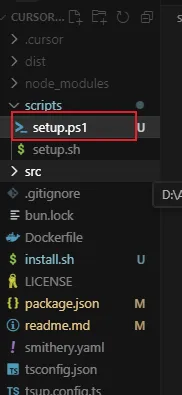
然后将"setup" 配置项改为
"setup": "node -e \"const os = require('os'); const { execSync } = require('child_process'); if (os.platform() === 'win32') { execSync('powershell -ExecutionPolicy Bypass -File ./scripts/setup.ps1', { stdio: 'inherit' }); } else { execSync('./scripts/setup.sh', { stdio: 'inherit' }); }\"",再在 script 下新增 setup.ps1 文件
内容如下
# PowerShell setup script for Windows

# Create .cursor directory if it doesn't exist
if (-not (Test-Path ".cursor")) {
    New-Item -ItemType Directory -Path ".cursor" -Force
}

# Install dependencies using bun
bun install

# Create mcp.json with the current directory path
$mcpConfig = @"
{
  "mcpServers": {
    "TalkToFigma": {
      "command": "bunx",
      "args": [
        "cursor-talk-to-figma-mcp@latest"
      ]
    }
  }
}
"@

$mcpConfig | Out-File -FilePath ".cursor/mcp.json" -Encoding UTF8

Write-Host "Setup completed successfully!" -ForegroundColor Green
之后我们再去 PowerShell 中执行命令即可
bun setup
bun socket
四、Figma 插件配置
1、在 Figma 中新建一个Drafts 文件
2、打开Plugins & widgets菜单
3、选择import from manifest选项
4、导入项目目录\src\cursor_mcp_plugin 下的manifest.json文件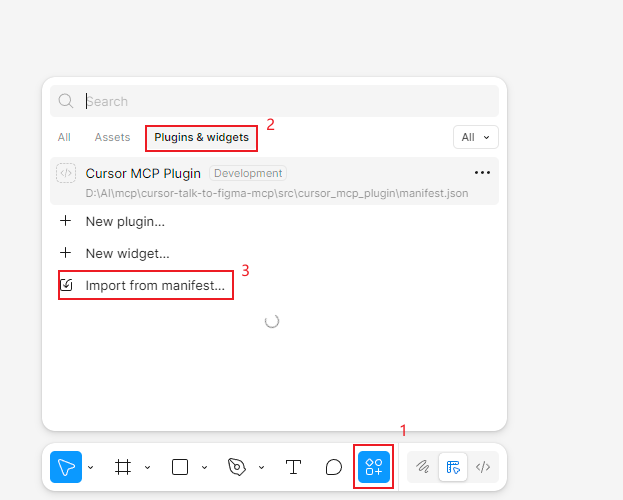
5、运行并记录 Channel 编码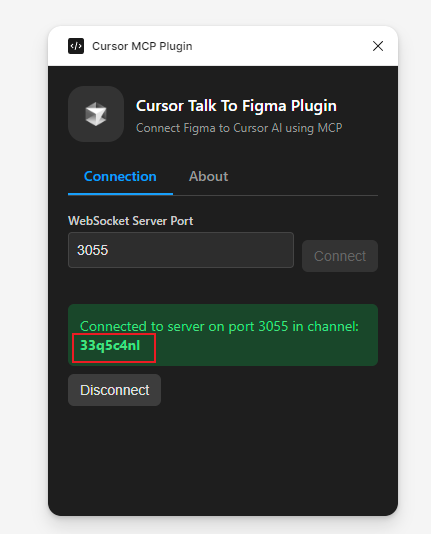
五、cursor 使用
Figma 服务建立连接
使用channel: 33q5c4nl 连接服务和Figma进行对话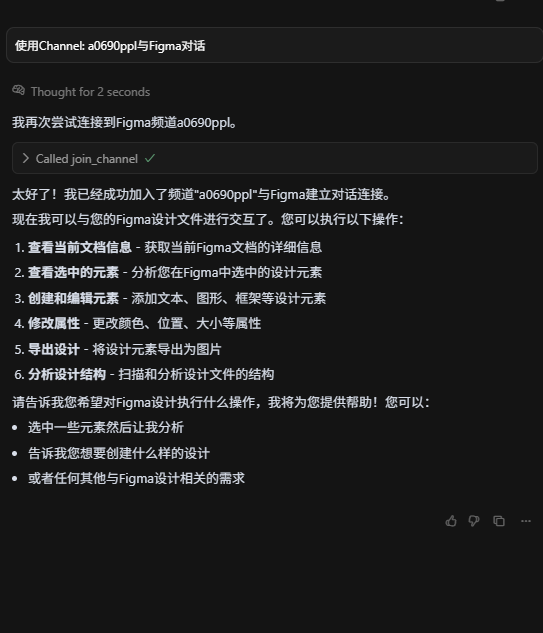
至此,我们的配置操作已经完成,开动你的想象力放手去干吧,接下来就是 Cursor 的表演时间!
凡是过往,皆为序章!



An innovative AI generator ai naked for removing clothing from photos. High-quality detail, complete privacy, and instant processing. Try it for free!
An innovative AI generator naked ai image generator for removing clothing from photos. High-quality detail, complete privacy, and instant processing. Try it for free!
An innovative AI generator ai naked generator for removing clothing from photos. High-quality detail, complete privacy, and instant processing. Try it for free!
An innovative AI generator naked ai image generator for removing clothing from photos. High-quality detail, complete privacy, and instant processing. Try it for free!
An innovative AI generator naked ai online for removing clothing from photos. High-quality detail, complete privacy, and instant processing. Try it for free!
An innovative AI generator naked ai online for removing clothing from photos. High-quality detail, complete privacy, and instant processing. Try it for free!
An innovative AI generator free naked ai for removing clothing from photos. High-quality detail, complete privacy, and instant processing. Try it for free!
Choosing an amazon ads agency is easier when every candidate receives the same account summary and answers the same questions about process, access, and measurement. Ask how the team audits search terms, campaign structure, match types, placements, budgets, bids, negatives, and duplicated targeting before proposing changes. Any unresolved access, ownership, or reporting issue should be clarified before onboarding.
баня бревно под ключ цена бани на заказ под ключ
бани готовые под ключ недорого баня из бруса под ключ цена
глаз бога скачать глаз бога программа для поиска
баня с доставкой и установкой под ключ баня под ключ с установкой
глаз бога по телефону глаз бога сайт
глаз бога онлайн глаз бога по телефону
глаз бога официальный бот глаз бога скачать
A detailed overview https://undress-tools.carrd.co of Undress AI and DeepNude technologies. Learn about image generation features, limitations of artificial intelligence, privacy policies, photo upload security, and terms of use.
построить баню под ключ купить баню из бруса под ключ
Нужен сыр? сыры оптом в москве в Москве для магазинов, кафе, ресторанов и предприятий общественного питания. Широкий выбор твёрдых, мягких и полутвёрдых сортов, выгодные условия закупки, оптовые цены и доставка продукции.
глаз бога поиск людей глаз бога официальный сайт
A detailed overview https://undress-tools.carrd.co of Undress AI and DeepNude technologies. Learn about image generation features, limitations of artificial intelligence, privacy policies, photo upload security, and terms of use.